
If you need to visit a bank but are unsure where the nearest branch is, a bank branch finder tool can make the process much easier. Instead of searching through scattered listings or relying on outdated information, you can use an IFSC code, bank name, or city to narrow down the branch you need.
This is particularly useful when you are looking for a branch for account-related services, document submission, cash transactions, cheque services, or other banking requirements. The key is knowing which information to enter and how to verify the result before making a trip.
What Is a Bank Branch Finder Tool?
A bank branch finder is an online search tool that helps users identify a bank branch based on information such as its IFSC code, bank name, state, district, city, or locality.
Many branch-finding tools are designed to make banking information easier to access. Depending on the service, a result may provide the branch name, address, IFSC code, city, district, state, and sometimes additional details such as contact information or operating hours.
The tool becomes especially valuable when you know only part of the branch information.
Why Branch-Finding Tools Are Useful
Suppose someone sends you an IFSC code but does not provide the branch address. Searching the IFSC code can help identify the associated branch.
Similarly, if you are travelling to another city and need to find a particular bank, searching by city can help you discover branches in that location.
A good bank branch finder reduces the amount of manual searching involved and gives you a convenient starting point for verifying banking details.
Information You Can Usually Find
Depending on the database, a branch search may show:
- Bank name
- Branch name
- IFSC code
- Branch address
- City or town
- District
- State
- Branch or bank contact details
- Other location-related information
Not every tool provides every field, so important details should always be checked against the bank's official information before acting on them.
How to Find a Bank Branch Using an IFSC Code
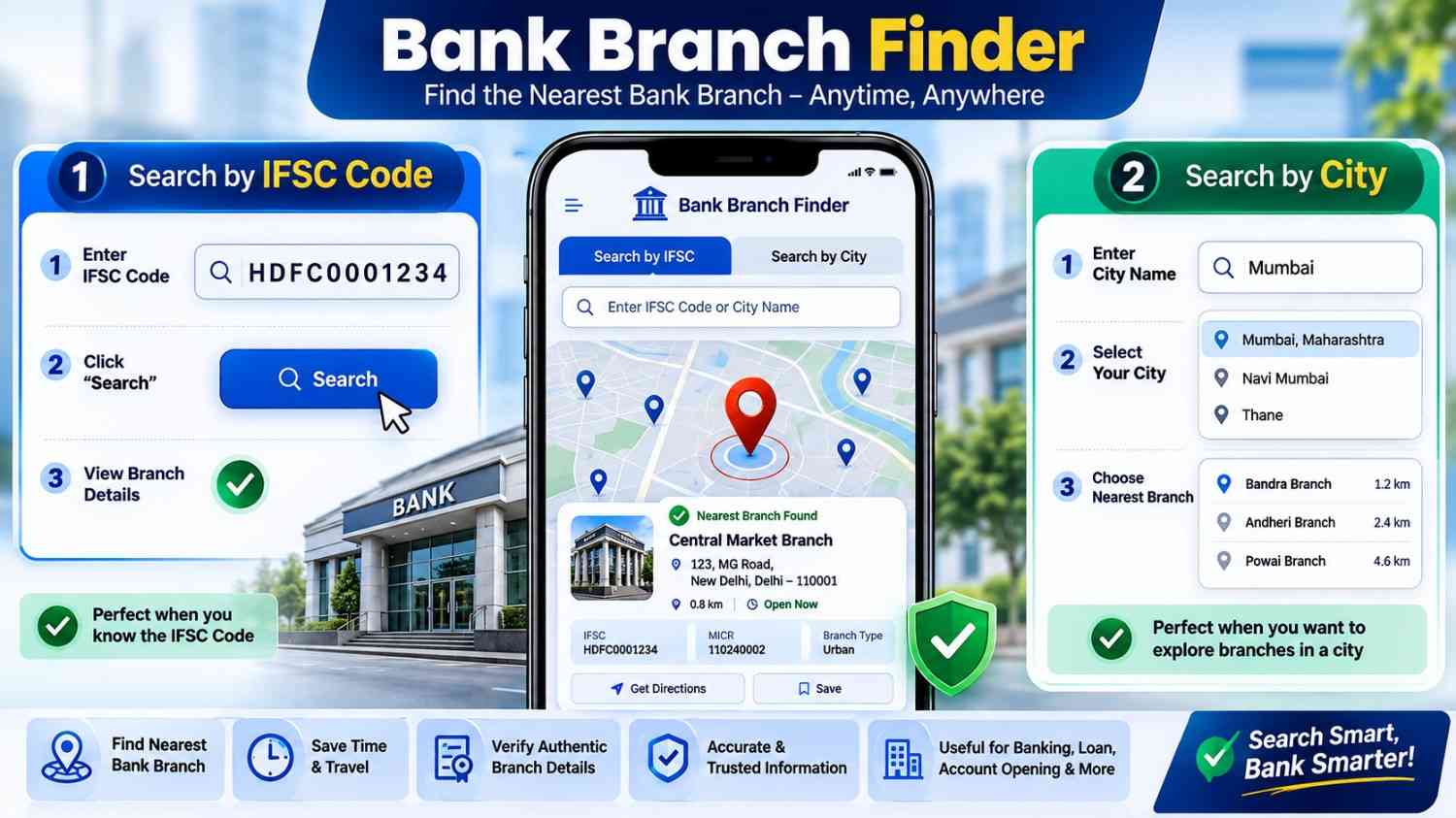
An IFSC code is one of the most precise ways to identify a particular Indian bank branch. Since an IFSC code is associated with a specific branch, it can be useful when you already have the code but need additional branch information.
Step 1: Enter the IFSC Code
Open a reliable bank branch finder and enter the complete IFSC code.
Check the characters carefully. An IFSC code contains letters and numbers, so confusing characters can produce an incorrect or empty result.
Step 2: Check the Search Result
Once the code is submitted, review the displayed information. Ideally, the result should identify the bank and branch associated with that code.
Look for details such as the branch name, city, state, and address.
Step 3: Match the Details
Do not rely only on the branch name. Compare multiple fields to make sure the result makes sense.
For example, if the IFSC code is associated with a branch in one city but the address you expected is in another, investigate before using the information for a transaction.
Step 4: Verify Important Banking Information
If you need the details for a financial transaction, verify them through the bank's official website or another authoritative source.
This is particularly important because branches can be relocated, merged, renamed, or closed.
How to Find the Nearest Bank Branch by City
If you do not know an IFSC code, searching by city is another practical approach.
A bank branch finder by city can help you locate branches in a particular city, district, or state.
Step 1: Select the Bank
Start by identifying the bank you want to visit. If the finder allows bank selection, choose the correct institution before entering the location.
This prevents unrelated branches from appearing in the results.
Step 2: Enter the City
Enter the city or town where you want to find a branch.
For a large city, you may get many results. In that case, adding a locality or district can make the search more useful if the tool supports more specific location filters.
Step 3: Review Nearby Branches
Compare the available branches based on their address and location.
A branch that appears first in a search is not necessarily the physically closest branch to you. Always check the actual address and, when possible, confirm the location using a current map service.
Step 4: Confirm Branch Services
Finding a nearby branch is only part of the task. The closest branch may not offer every service you need.
If you need a particular service, such as a specific account facility, locker service, cash transaction, or document-related assistance, check with the bank before visiting.
IFSC Search vs City Search: Which Is Better?
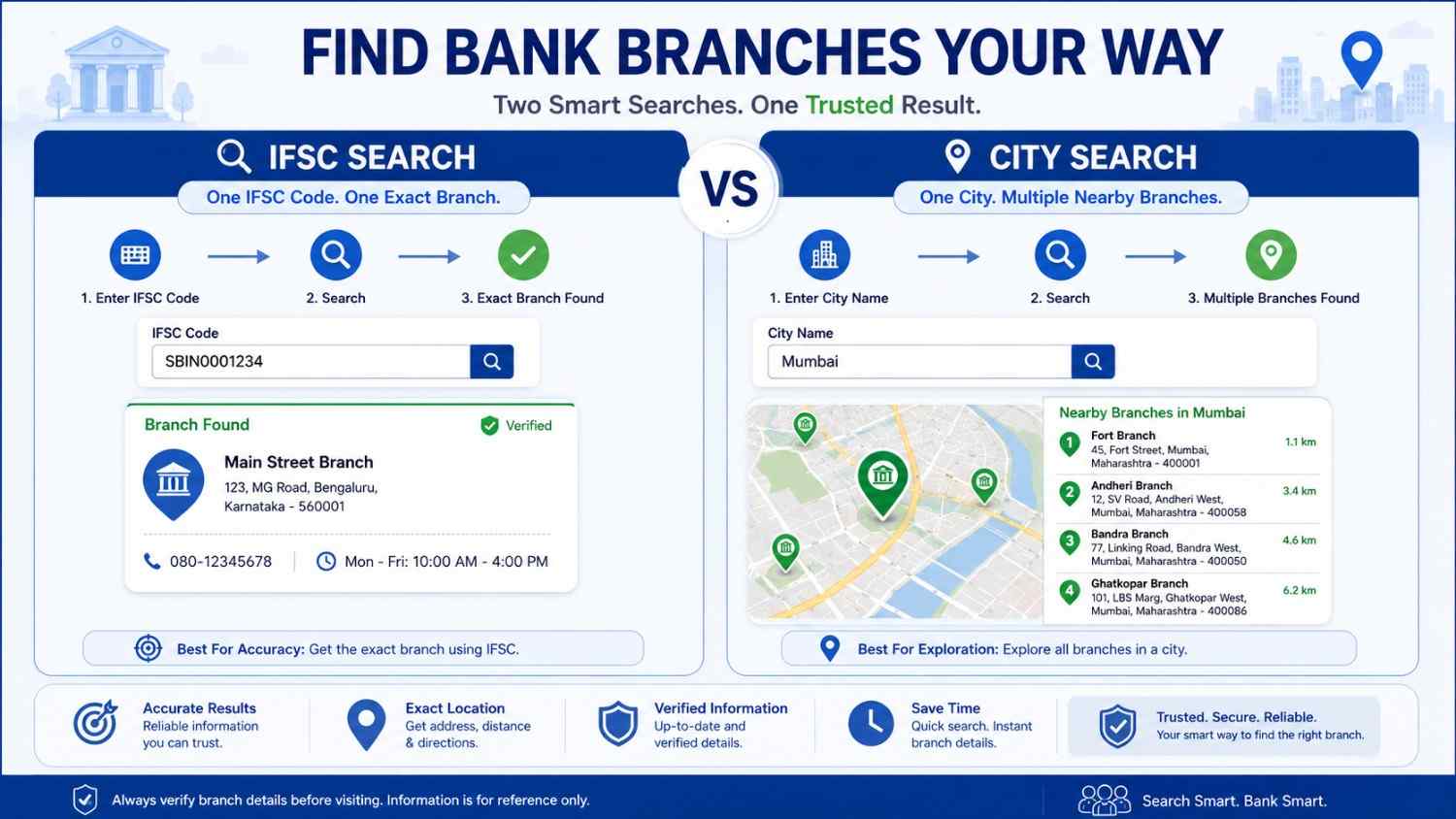
The best search method depends on what information you already have.
| Search Method | Best For | Accuracy |
|---|---|---|
| IFSC code | Identifying a specific branch | Very high |
| City | Finding branches in a location | Moderate |
| Bank + city | Narrowing results to one bank | High |
| City + locality | Finding a convenient nearby branch | Higher |
| Branch name | Identifying a known branch | Depends on uniqueness |
An IFSC search is generally more precise when you already know the code. A city search is more useful when your main goal is finding a convenient physical location.
Benefits of Using a Bank Branch Finder
A branch locator can be useful for both routine and occasional banking needs.
Saves Time
Instead of manually searching through pages of bank information, you can enter a few details and quickly narrow down the possibilities.
This can be particularly helpful when you need to visit a branch on short notice.
Helps Identify Unknown Branches
Sometimes a bank statement, cheque, payment document, or financial record contains an IFSC code but no obvious branch address.
Searching the code can help you understand which branch the information refers to.
Makes City-Based Searches Easier
If you have recently moved, are travelling, or need to conduct banking in another city, a location-based search can help you identify relevant branches.
Reduces Basic Search Errors
Searching systematically by bank, IFSC, and location can be more reliable than guessing a branch from a partial name.
However, the quality of the result depends on the source's database, which is why verification remains important.
Useful for Banking Documentation
Branch information may be needed when completing forms, checking account records, communicating with a bank, or understanding transaction details.
A branch finder can provide a convenient way to organize that information before taking the next step.
How to Check Whether Branch Information Is Correct
Finding a branch is not enough if the information is going to be used for an important banking purpose.
Verify the IFSC Code
If you have an IFSC code, compare it with information published by the relevant bank or another trusted financial source.
Do not assume that an old code is still active simply because an online search produces a result.
Check the Address
Look at the complete branch address rather than only the city name. This helps distinguish between branches that operate in the same city.
Confirm Current Status
Banks may change their branch networks over time. A branch can relocate, merge with another branch, or cease operations.
If the visit is important, confirm that the branch is currently operating.
Check Working Hours Separately
Branch working hours can vary by institution, location, service, and day. Public holidays and special banking schedules can also affect availability.
For this reason, confirm the current schedule before travelling.
Common Mistakes When Searching for a Bank Branch
Even a simple branch search can go wrong if basic details are overlooked.
Entering an Incorrect IFSC Code
A single incorrect character can lead to the wrong result or no result at all. Copy the code carefully when possible.
Assuming the Nearest Result Is Actually Nearest
Search rankings and physical distance are not always the same thing. Use the displayed address and a current map to judge convenience.
Using Outdated Information
Third-party databases may not update immediately when banks change branch details.
For important transactions, cross-check the information with the bank.
Confusing Similar Branch Names
Large cities can have branches with similar names. Compare the IFSC, locality, and complete address before selecting one.
Ignoring the Required Service
The closest branch may not provide the service you need. Confirm service availability before making the trip.
When Should You Use an IFSC Code Instead of a City?
Use an IFSC-based search when your goal is to identify a specific bank branch.
For example, if you have received an IFSC code from a business, customer, employer, or financial document and want to determine the corresponding branch, searching the code is usually the more direct approach.
Use a city-based search when you are primarily interested in finding a convenient branch in a particular location.
The distinction is simple: IFSC searches identify a specific branch, while city searches help discover branches within an area.
Tips for Finding a Convenient Branch
A little preparation can make your bank visit much easier.
Search by Locality When Possible
If the city has many branches, add the neighborhood or locality to your search. This can reduce the number of irrelevant results.
Check the Complete Address
Do not rely solely on a branch name. The complete address provides a better indication of whether the branch is practical for you to visit.
Verify Before a Time-Sensitive Visit
If you need to submit documents or complete a transaction by a deadline, confirm the branch's current status and operating schedule first.
Keep the IFSC for Reference
Once you identify the correct branch, save its IFSC and other relevant details if you expect to need them again.
Use Official Sources for Final Confirmation
A third-party finder can be convenient for discovery, but the bank's own published information should generally be preferred for final verification of important details.
Is a Bank Branch Finder Safe to Use?
Using a branch finder to look up public branch information is generally straightforward, but you should still be careful about the information you provide.
A basic branch search should not require sensitive banking credentials.
Never enter your:
- Internet banking password
- ATM PIN
- One-time password
- Card PIN
- Full banking login credentials
- Other confidential authentication information
A legitimate branch search generally needs location or branch-identification information, not access to your bank account.
If a website unexpectedly asks for sensitive financial credentials simply to locate a branch, stop and verify the service before proceeding.
What If the IFSC Code Cannot Be Found?
There are several possible reasons.
The code may have been entered incorrectly, the branch may have changed status, or the database may not have the latest information.
Start by checking the characters in the IFSC code. Then try confirming it through the bank's official channels.
If the code is associated with an old branch, the bank may be able to explain whether it has been changed, merged, or discontinued.
FAQ
How can I find a bank branch using an IFSC code?
Enter the complete IFSC code into a reliable branch finder. The resulting information can help identify the associated bank, branch, city, state, and address. Verify important details with the bank before using them for a transaction.
Can I find a bank branch by city?
Yes. Many branch-finding services allow searches by bank and city. You can then compare the listed branch addresses to identify a convenient location.
Is an IFSC code linked to a bank branch?
Yes. An IFSC code is used to identify a particular bank branch for electronic banking transactions. Because of this, it is a useful identifier when searching for branch information.
How do I find the nearest branch of my bank?
Search for your bank and city or locality, then compare the addresses of the available branches. A current map service can help you determine which branch is physically closest to your location.
Can a bank branch move or close?
Yes. Banks can relocate, merge, rename, or close branches. This is why older branch information should be verified before relying on it.
Should I trust a third-party bank branch finder?
A third-party finder can be useful for quickly discovering information, but important details should be cross-checked with the bank or another authoritative source, especially before financial transactions.
Can I find a branch address from an IFSC code?
Usually, an IFSC lookup can provide branch-related information, including the branch name and location. The exact information available depends on the database being used.
What should I do if the branch information looks outdated?
Check the bank's official website or contact the bank directly. This is especially important if you plan to visit the branch or use the information for a financial transaction.
Conclusion
A bank branch finder tool can turn a potentially frustrating search into a quick process. If you already have an IFSC code, use it to identify the specific branch associated with that code. If you simply need a convenient location, search by bank, city, or locality.
The most important step is verification. Branch details can change, and not every online database is updated at the same time. Before visiting or using branch information for an important financial purpose, confirm the address, current branch status, and required services through an authoritative source.
With the right search method and a quick verification step, finding the right bank branch becomes considerably simpler.


Write a comment